
Common questions, straight answers.
Can't find what you need? Email support@cardiocommandapp.com and I'll get back to you.
Setup and compatibility.
Which Apple Watch models are supported?
Cardio Command requires Apple Watch Series 6 or later running watchOS 26. Series 6 introduced the improved optical heart rate sensor and the hardware needed for always-on display. Series 4 and 5 won't work — the HR sensor and the S6 chip are both required for the 5-second sampling cadence the game depends on.
Do I need to bring my phone?
No. Leave it at home. Everything runs on the Watch — the game, the heart-rate reading, the scoring, the audio cues, Trail Radio, the Summit Card, and sharing. Nothing about a climb needs your iPhone in range.
That includes your own music. If you've synced playlists or albums to the Watch itself, they play from the Watch with Bluetooth headphones and Cardio Command's cues duck over the top exactly as they would with the phone nearby. (Streaming music you haven't downloaded to the Watch does need a connection — that's a Watch limitation, not ours.)
The Watch stores every climb locally and syncs to the iPhone app over your own iCloud whenever the two are next both online. So you can climb for a week without touching your phone and still find the whole history waiting when you open it.
How do I get my music onto the Watch?
That part is Apple's, not ours: in the Watch app on your iPhone, go to Music (or Podcasts / Audiobooks) and add the playlists or albums you want synced. They download to the Watch over Wi-Fi while it's charging. After that they play without the phone.
If you'd rather not manage any of that, Trail Radio is built into Cardio Command — three original instrumental packs that live inside the app, need no syncing, and are in the free tier.
What HealthKit permissions does the app need?
Cardio Command asks for three permissions: heart rate (read + write), workouts (write), and activity (read). Heart rate is required — it's what powers the whole game. The workout write permission lets your climbs appear in the Health app like any other workout. Activity read is used to sanity-check zone estimates during onboarding. You can deny activity read and the app still works.
What are heart rate zones and how does the app set them?
Heart rate zones are ranges of effort defined as percentages of your maximum heart rate. Zone 1 is easy (50–60%), Zone 5 is all-out (90–100%).
At launch the app sets your zones from your age and your heart-rate history in Apple Health — it reads your highest recorded heart rate from the last two years alongside the age-based estimate and takes the higher of the two, then derives the five zones from that. You can also enter a max heart rate manually if you know yours from a lab test or a field test, and recalibrate any time via Settings → Recalibrate Zones.
Reading Apple's own computed zones directly is coming with watchOS 27. Apple introduced a proper zones API that lets an app use the zones watchOS calculates from your workout history and VO₂ max estimate rather than deriving its own. Cardio Command will adopt it once watchOS 27 ships — until then the age-plus-history method above is what's used, and manual entry is there if you want to override it.
Should I turn off Always-On Display during a session?
Yes, if battery life matters to you. Always-On Display alone costs roughly 30% of daily battery. For a 30-minute climb the difference is noticeable. The app shows a reminder during onboarding. The game works fine either way — when your wrist is down, the display simplifies to a minimal "still running" state and restores full animation when you raise your wrist.
What's happening on screen.
My heart rate isn't updating. What's wrong?
First, make sure the Watch is snug on your wrist — loose fit is the most common cause of poor optical HR readings. Cardio Command uses HealthKit's live workout query, which delivers a sample approximately every 5 seconds. If you haven't moved in a while (e.g., sitting during onboarding calibration) the readings can be slow to update. During an active workout the cadence is reliable. If the display shows the same number for more than 15 seconds during exercise, try re-seating the Watch on your wrist.
The zone bar says I'm out of zone but it feels like I'm working hard enough.
Two possibilities. First, your zone calibration may be off — if the bar consistently under-reads your effort, go to Settings → Recalibrate Zones and run Option B with a manual max HR. Second, optical HR sensors can lag by 10–20 seconds when HR is rising rapidly (like at the start of a sprint). The number you see is real, just slightly behind. The lag evens out over the course of a session.
What does a Whiteout event look like?
The heart rate number disappears and the screen dims to a grey haze for 30 seconds. The zone bar is still visible — you can see roughly where you should be — but you lose the specific BPM readout. The haptics still fire (entering zone = double-tap, leaving zone = single sharp tap), so you can navigate without looking. Surviving the full 30 seconds while staying in zone earns the Whiteout Survivor badge.
How do I pause or stop mid-climb?
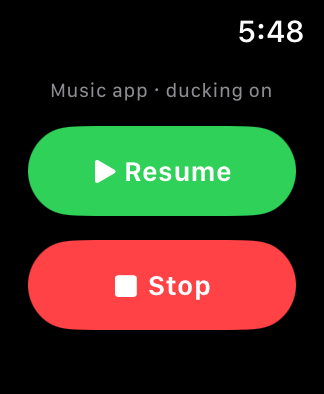
Swipe left from the game screen to reach the controls page, then choose Pause or Stop. There's deliberately no Stop button on the game screen itself — it was removed because it's far too easy to hit by accident with a sweaty wrist mid-interval, and ending a climb should take a moment of intent.
Stopping saves the climb as-is: your score, your time in zone, and your heart-rate trace up to that point are all recorded, and you still get a Summit Card. Badges that don't require finishing can be earned from a partial climb — Whiteout Survivor and Streak Climber both count. What a partial climb doesn't do is mark the summit as reached, so it won't advance Range Master or Everest Conquered.
Pause holds the clock and stops scoring until you resume, so a traffic light or a water stop doesn't cost you your streak.
Billing and restoring.
I got a new Apple Watch. How do I restore my Pro purchase?
Open Cardio Command on the new Watch, go to Settings, and tap Restore Purchases. The App Store recognises your Apple ID and restores everything you've paid for. You don't need to repurchase. Your climb history syncs automatically via iCloud — as long as both your Watch and iPhone are signed into the same Apple ID, your full history will appear on your iPhone once the new Watch connects to the internet.
Is Storm Shelter a separate purchase?
No — Storm Shelter is part of Pro. There's exactly one purchase in Cardio Command: Cardio Command Pro at $3.99, which includes Storm Shelter along with all five mountains, all eleven interval programs, Rescue Mission, and the 45 and 60-minute climbs.
An earlier plan had Storm Shelter as its own cheaper tier. It was dropped before launch: App Store one-time purchases can't credit what you already paid toward a later upgrade, so "buy the small one now, pay the difference later" was a promise that couldn't actually be kept. One purchase is simpler and nobody ends up paying twice.
Is there a subscription? Will I be charged again?
No subscription, and there's only one thing to buy. Cardio Command Pro is a single one-time purchase — pay once, keep it forever, on every device signed into your Apple ID. No recurring charges, no auto-renewals, no trial that converts. If extra content ever ships it would be a separate optional purchase, never a retroactive charge on something you already own.
How do I request a refund?
Refunds are handled by Apple. Go to reportaproblem.apple.com, sign in with the Apple ID you used to purchase, and request a refund from there. I can't process refunds directly — all billing flows through the App Store.
Drop me a line.
If your question isn't here, email me directly. I read every message and reply to all of them — usually within a day.
support@cardiocommandapp.com